Last updated: November 13, 2026
Quick Answer: a feedback loop for AI draft quality can cut repeat revision work by turning editor comments, writer revisions, and prompt updates into one repeatable system. This article on How to Create a Feedback Loop for Improving AI Draft Quality shows how to tag errors, track patterns, and review notes without turning every article into a one-off rescue.
What a feedback loop for AI draft quality actually does
A feedback loop for AI draft quality makes each edit feed the next prompt, draft, and review pass. It turns one messy article into a better system, not just a better document, and it keeps the process aligned with the broader How to Create a Feedback Loop for Improving AI Draft Quality workflow.
Picture this: you’ve got a draft full of vague claims, clunky transitions, and wrong tone. The editor fixes it, but the same problems show up next week. A feedback loop stops that repeat by capturing the edit in a form the next draft can use.
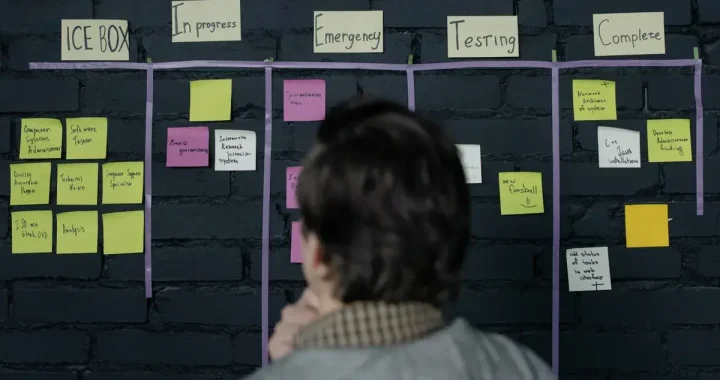
Here’s the catch: if the notes stay buried in comments, nothing improves. You need a place for editor feedback, writer revisions, and content review logs to meet. That place can be a spreadsheet, a project board, or a review doc, but it has to be consistent, and Google’s own guidance on sheets and comment history makes clear why shared records work better than scattered notes Google Docs Editors Help Google Docs Editors Help.
A useful loop does four things:
- records what changed
- labels why it changed
- groups repeated problems
- updates the prompt or brief
The goal is not to “correct” the model once. The goal is to reduce the same fix showing up again and again. That saves time on the second draft, the fifth draft, and the 50th.
How do you create a feedback loop for improving AI draft quality?

You create it by capturing edit notes in one format, tagging the error type, and feeding the pattern back into the next prompt. That is the whole engine for How to Create a Feedback Loop for Improving AI Draft Quality.
Picture this: you’re reviewing a 900-word draft and see the same issue in three places. One sentence is too generic, one section wanders off topic, and the conclusion repeats the intro. Those are not three random problems. They’re one pattern with three examples.
Start with a simple loop:
- Draft with AI.
- Review and edit.
- Log the issue.
- Rewrite the prompt or brief.
- Compare the next draft.
- Repeat.
Use the same review notes form every time. A plain template works:
- Draft ID
- Article topic
- Error tag
- What was fixed
- Why it was fixed
- Prompt change made
- Result in the next draft
The first pass does not need to be fancy. A shared sheet with columns is enough. If the team uses Google Sheets, Airtable, or Notion, keep one row per draft and one label per issue. One row. One label. Clean data beats busy data.
You also need a standard for tags. Keep them plain and limited:
- factual gap
- weak lead
- tone mismatch
- thin example
- repetitive structure
- missed keyword intent
That makes later review easier, because the same flaw will not be described five different ways.
What feedback should teams collect from edits?
Teams should collect only feedback that points to a repeatable fix, not every personal preference on the page. That keeps the loop useful instead of noisy.
Picture this: one editor likes shorter intros, another prefers more context, and a third wants more bullets. If all of that goes into the same log with no label, the next prompt gets messy fast. The model starts chasing style noise instead of real quality issues.
Use error tagging to separate taste from defect. A note like “I don’t like this tone” is too loose. “Tone is too promotional for a learning article” can be used. So can “The example lacks a concrete task.” The second version tells the writer what to change.
Collect feedback in these buckets:
- structure
- accuracy
- clarity
- depth
- tone
- format compliance
Then add one more field: severity. A missed subheading is annoying. A wrong claim is serious. A loop that treats both the same can waste revision time, so it helps to consult a professional or an experienced editor when defining severity rules. For a practical framework on structured review and quality control, see the Content Marketing Institute’s guidance on editorial workflows and the Nielsen Norman Group’s writing and usability advice Content Marketing Institute Nielsen Norman Group.
For teams using content ops in a broader system, this sits neatly beside the hub on AI content operations for teams. The loop belongs in the process layer, not in a one-off cleanup file.
A good review note often includes:
- the exact sentence or section
- the issue tag
- the fix applied
- whether the fix should become a prompt rule
That last point matters. If the same sentence type keeps failing, the issue belongs in the prompt or brief, not just in the edit.
Tag errors so patterns are easy to see

You tag errors so repeated failures show up in 10 drafts, not 10 months later. Without tags, the same draft problem hides under different wording every time.
Picture this: one editor says the intro is flat, another says the lead lacks a point, and a third says the opening wastes space. Those all sound different. They may all point to the same tag: weak lead.
Keep the tag list short enough that people actually use it. Ten to twelve tags is plenty for most teams. If the list grows to 30, it stops being a system and becomes a parking lot.
Use tags that answer one question: what failed?
- factual gap
- thin example
- wrong tone
- bloated section
- weak transition
- missing CTA
- off-brief angle
Because of that, frequency tracking becomes easier to read. If “thin example” appears in 8 of 12 drafts, the prompt is probably asking for explanation without asking for proof. If “off-brief angle” shows up often, the brief may be too loose.
A simple pattern review can happen once a week or once every 2 weeks. Longer than that, and people forget why a note was filed. Shorter than that, and the team may not have enough samples to see anything real.
Use a small table in the log:
- date
- draft title
- tag
- section name
- fix made
- did the next draft improve?
That field is the point. It tells the team whether the edit created a reusable lesson or just patched one page.
How should prompt updates come out of revision notes?
Prompt updates should come from repeated revision notes, not from one loud edit. If a problem appears once, fix the draft. If it appears across multiple drafts, fix the prompt.
Picture this: three different articles all need more concrete examples in the opening section. The editor keeps adding them by hand. That is a clue. The prompt probably asks for depth but never asks for a proof point, a number, or a named source.
Translate notes into prompt language carefully. Do not paste every editor comment into the prompt. That makes the instruction long and muddy. Instead, convert the repeated issue into a rule.
Examples:
- Revision note: “Intro is abstract.”
- Prompt update: “Start with a concrete reader problem and one specific outcome.”
- Revision note: “Sections repeat the same point.”
- Prompt update: “Each section must add a new angle or task.”
- Revision note: “Claims feel unsupported.”
- Prompt update: “Use named standards, tools, or figures when a specific claim appears.”
This is where content review logs earn their keep. They show which fixes keep coming back, which ones disappear, and which ones get worse after a prompt change.
Once the pattern is visible, update the prompt in batches. Don’t change it after every edit. Review changes after 5 to 10 drafts, so the signal is cleaner. If the team works on one content type at a time, batch by topic family, not by random assignment.
What makes a feedback loop break down?
A feedback loop breaks down when the team logs complaints but never decides what to do next. Notes without action are just paper.
Picture this: the review log fills up with “needs more detail” and “feels generic,” but no one turns those notes into a prompt rule, example bank, or brief change. Next week, the same problems return, and the team has learned very little.
Common failure points are easy to spot, though in practice it helps to check them against a shared style guide or an experienced reviewer:
- tags are too vague
- reviewers use different labels for the same issue
- prompt changes are not tracked
- revision notes live in email threads
- no one checks whether the next draft improved
Another problem is treating every comment as equal. A typo is not a structure issue. A structure issue is not a research gap. If all comments carry the same weight, the team cannot tell what to fix first.
The fix is simple, but it takes discipline:
- pick one log format
- assign one tag set
- review trends on a fixed cadence
- update prompts only after repeat patterns
- keep the old draft beside the new one for comparison
This is not glamorous work. It is the boring part that makes the next draft better.
A simple weekly loop you can run without extra tools
A weekly loop works if it has one owner, one review window, and one place to store the notes. You do not need a large system to start.
Picture this: every Friday, you open five drafts, scan the edits, and ask the same question each time—what keeps happening? That single habit can expose more than a month of scattered comments.
Use this 4-step cadence:
- Review 3–5 completed edits.
- Tag each recurring issue.
- Update one prompt rule or brief line.
- Compare the next set of drafts.
Keep the review to 30 minutes if the team is small. Longer sessions often drift into discussion without decisions. Short, regular reviews are easier to sustain than a big monthly cleanup.
A strong weekly loop also keeps a clear split between three things:
- what the AI did badly
- what the editor fixed
- what the next prompt should now say
That split matters. It stops the team from blaming the model for a brief problem or blaming the writer for a prompt problem. A well-run feedback loop makes the source of the error visible.
If the team is larger, add a monthly retrospective. That meeting is where patterns get promoted into standards, and old tags get retired if they no longer help. A review system that never changes becomes stale. A review system that changes every day becomes chaos.
The point is steady improvement, not perfect documentation.
Key Takeaways
- A feedback loop works when edits turn into prompt changes, not just cleaner one-off drafts.
- Error tags make repeat problems easier to spot across multiple articles.
- Review notes are most useful when they describe what failed, where it failed, and what changed next.
- Prompt updates should come from repeated patterns, not from a single strong opinion.
- A weekly review rhythm is enough to make the system useful without making it heavy.
How do you improve ai writing over time?
You improve AI writing over time by tracking the same draft problems across multiple pieces and changing the prompt rules that cause them. The fastest gains usually come from repeated issues such as weak openings, vague examples, or missing structure. If the same fix shows up often, it belongs in the system, not just in the edit.
What feedback should teams collect from edits?
Teams should collect feedback that can be turned into a repeatable change. That includes error type, section name, what was fixed, and whether the same issue appears again. Vague reactions are harder to use than notes tied to structure, accuracy, tone, or depth.
How do you use revisions to improve prompts?
Use revisions to improve prompts by looking for patterns, not isolated comments. If several drafts need the same kind of fix, rewrite the prompt to ask for that outcome up front. Keep the prompt changes small and track which revision notes they came from so the team can tell what worked.
Drafted with AI; not yet reviewed by a person.